


AttendanceApril 9, 20260 Comments
Walk into most martial arts schools and you’ll find the same attendance system that’s been in use for decades: a stack of laminated cards, a bin by the door, and a front desk staff member tabulating checkmarks at the end of the week. It works — until it doesn’t. Cards get lost. Tabulations fall behind. And when belt test time comes around, the master instructor is making promotion decisions based on memory and gut feel rather than data.
OnMat’s martial arts attendance software changes that completely. Here’s how it works — from the moment a student walks through the door to the moment an instructor decides they’re ready to test.
The Old Way — And What It Actually Costs You
The laminated card system is more common than most software companies acknowledge. A student converts from trial to full membership, gets a card with their name and a grid of boxes, and drops it in a bin before each class. Someone at the front desk collects those cards, tabulates the marks, and files them away.
The problems are obvious once you think about them. Cards get misplaced. Students forget to check in. Tabulations fall behind during busy weeks. And when a parent asks “how many classes has my child attended this month?” the honest answer is often “let me go look that up” — followed by a manual count.
More importantly, when it’s time to consider a student for belt testing, the instructor is working from incomplete data. At most schools, the decision of when a student is ready to test comes down to the master instructor’s judgment — which is valuable, but shouldn’t have to compensate for a system that can’t tell them how many classes a student has actually attended at their current belt level.
Belt testing is a significant revenue source for martial arts schools. When attendance data is unreliable, schools face a difficult choice between promoting students who may not be fully ready and losing the testing revenue altogether. OnMat removes that tension by making the data trustworthy.
Check-In That Actually Gets Used

The most important thing about an attendance system is that students actually use it — every class, without staff intervention. OnMat’s check-in is designed around that reality.
The primary method is a dedicated iPad mounted at the entrance to the mat or at the front desk, running OnMat in Attendance Mode. When students arrive, the screen is already showing the next scheduled class based on the calendar. The student types the first few letters of their name, a filtered list appears with their photo, they tap their name and confirm — done. The whole interaction takes about five seconds.
Because OnMat knows your class schedule, it automatically assigns each check-in to the right class at the right time. No manual entry. No end-of-day reconciliation. The attendance record is created the moment the student taps their name.
Students and parents can also check in remotely through OnMat Edge, the parent and student portal — useful for schools that want to track attendance for online or hybrid classes as well.
Tardy Tracking — The Detail That Matters
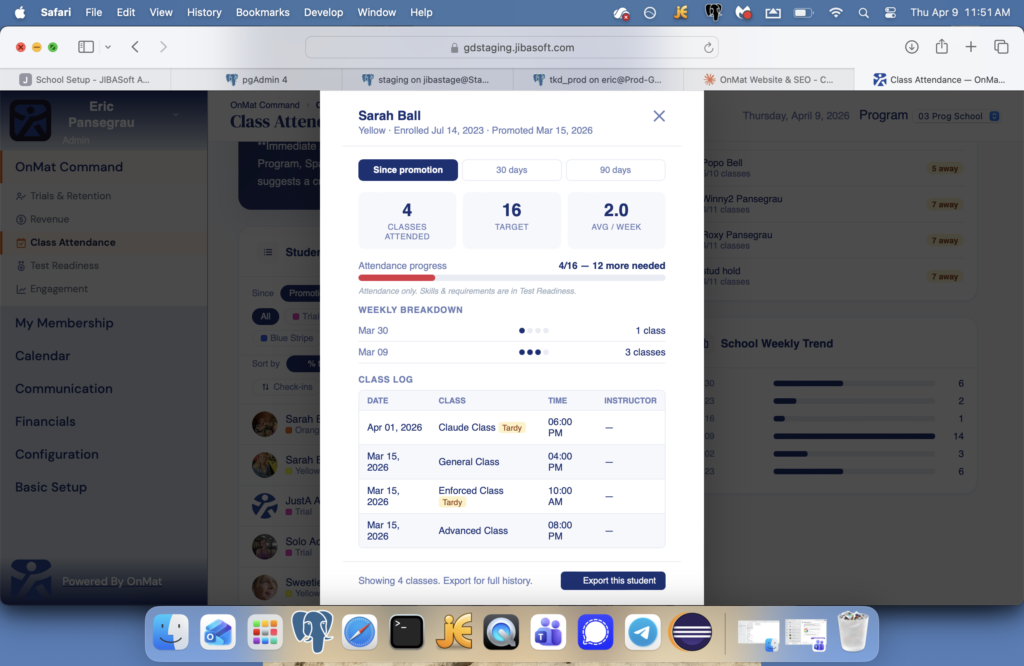
OnMat doesn’t just record whether a student showed up — it records when. If a student checks in after the scheduled class start time, the system automatically flags the attendance as tardy. That record is stored in the student’s class log alongside the date, class name, time, and instructor.
A single late arrival is nothing to worry about. But when tardiness becomes a pattern, OnMat gives the school owner the data to have that conversation with the member or parent — grounded in specific dates and times, not impressions. That’s a very different conversation than “I’ve noticed your child has been arriving late.”
Attendance and Belt Testing — Connected in One System
This is where OnMat’s attendance tracking goes beyond anything a laminated card system can offer.
Every belt level in OnMat has a recommended number of classes defined by the school. As students attend classes, OnMat tracks not just their overall attendance but their attendance at their current belt level specifically. When a student is approaching their attendance threshold — within five classes of their target, for example — OnMat flags them automatically.
In OnMat Command’s Class Attendance dashboard, the school owner sees this at a glance: total check-ins for the period, average classes per student, how many students are near their test threshold, and who has perfect attendance. No manual cross-referencing. No spreadsheet lookups. The system connects attendance data to test readiness automatically.
When the master instructor sits down to decide who tests next, they’re looking at real numbers — classes attended, classes required, progress toward the belt threshold — not relying on memory or gut feel alone. That’s better for the student, better for the school’s standards, and better for the integrity of the belt system.
The OnMatAI Attendance Briefing
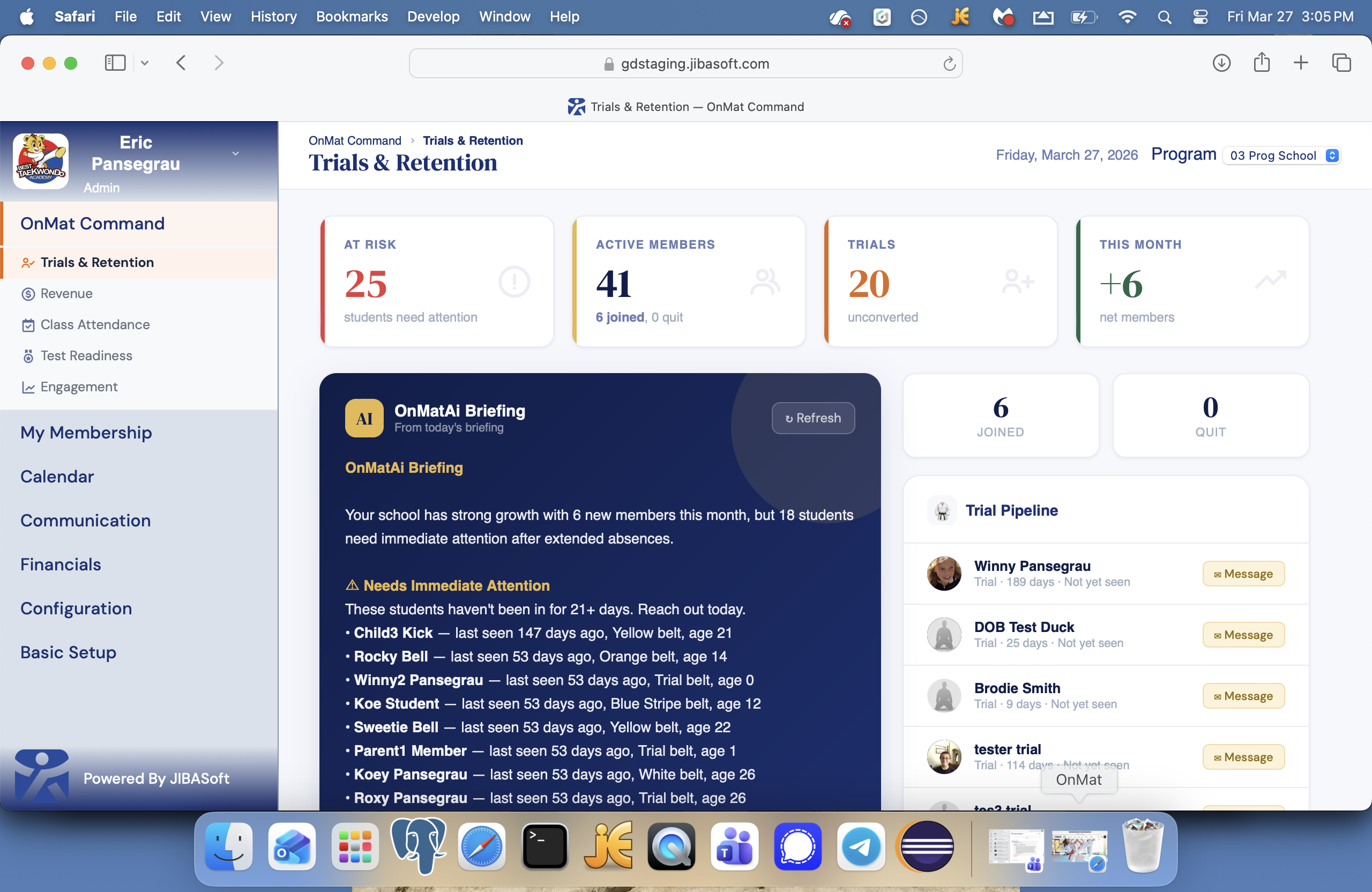
OnMat Command includes an AI-powered daily briefing specifically for attendance. Every day it reads your school’s attendance data and surfaces what needs your attention — which students are falling behind, which classes have low turnout, and where immediate outreach is warranted.
A typical briefing might flag that three students are near their test threshold, that two trial members have attended significantly fewer classes than expected for their stage in the pipeline, and that one regular member hasn’t been in for over two weeks. Each flagged student links directly to their profile where the school owner can send a text or email in one click.
If a student hasn’t been to class in two weeks, something is wrong. They might be injured, dealing with a schedule change, or quietly drifting toward cancellation. OnMat catches that early — when a personal outreach can still make a difference — rather than after the cancellation has already happened.
Class-Level Reporting — Know Which Programs Are Thriving
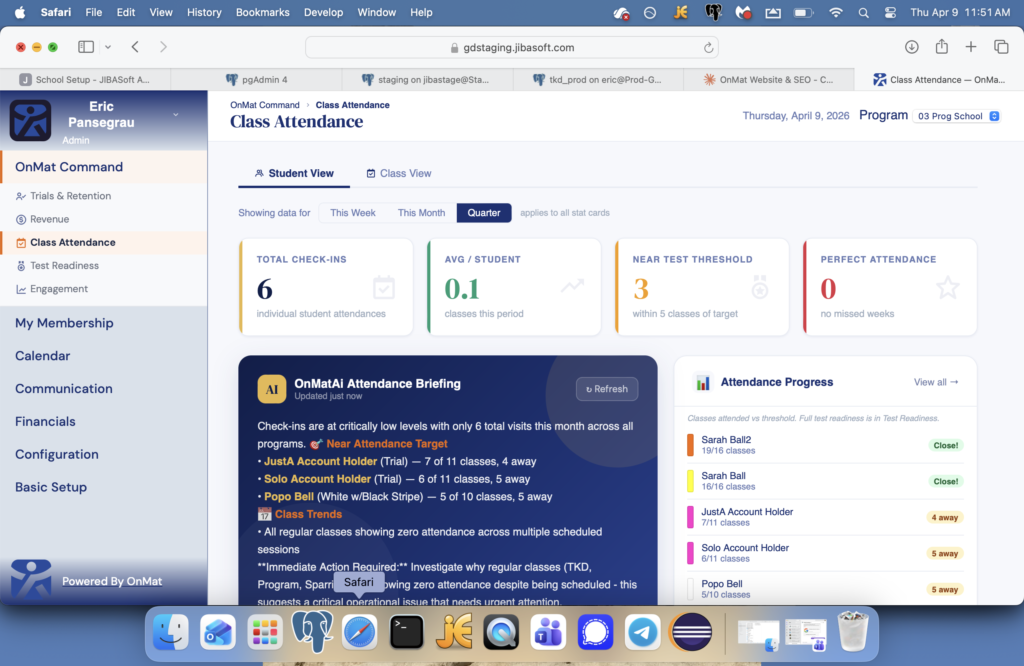
Beyond individual student tracking, OnMat’s Class Attendance dashboard shows school-wide trends over time. Which classes have the highest attendance? Which time slots are thinning out? How does this month compare to last quarter?
The dashboard can be filtered by week, month, or quarter. A School Weekly Trend chart shows attendance patterns across all programs at a glance. For school owners managing multiple programs — taekwondo, BJJ, kids classes, adult classes — this kind of visibility is essential for making decisions about scheduling, staffing, and program investment.
If your Tuesday evening advanced class consistently draws two students and your Saturday morning kids class fills every week, that’s information you can act on. Without attendance software, you’re guessing. With OnMat, you’re deciding.
From Laminated Cards to Real Data
The laminated card system isn’t broken — it’s just manual, incomplete, and disconnected from everything else you’re trying to do. It can’t tell you who’s close to testing. It can’t flag the student who’s been absent for three weeks. It can’t show you which class is losing attendance before it becomes a problem.
OnMat’s martial arts attendance software is built into the same platform that handles your billing, belt testing, member management, and AI-powered school briefings. Every check-in feeds into test readiness. Every absence feeds into retention alerts. Every pattern feeds into the decisions you make about your school.
That’s not just attendance tracking — it’s the data infrastructure that lets you run a smarter school.
Frequently Asked Questions
What is the best martial arts attendance software?
OnMat tracks attendance automatically from a dedicated iPad at the entrance to the mat. Students check in with a single tap, the system assigns them to the correct class, and the attendance record is created instantly. No clipboards, no laminated cards, no manual tabulation.
How does OnMat replace laminated attendance cards?
Instead of students finding a card and dropping it in a bin, they tap their name and photo on the iPad check-in screen. OnMat records the date, time, class, and instructor automatically. Parents can also check in remotely through OnMat Edge, the member and parent portal app.
Does attendance tracking connect to belt testing?
Yes — this is one of OnMat’s most powerful features. Every belt level has a recommended attendance threshold. OnMat tracks each student’s attendance at their current belt level and flags students who are approaching their test threshold automatically. The school owner sees this in OnMat Command without any manual cross-referencing.
Can OnMat track which students are at risk of quitting?
Yes. OnMat Command’s AI-powered daily briefing surfaces students whose attendance has softened — often months before they would appear on a traditional at-risk list. The briefing tells the school owner which student to contact, why, and what action to take.
Does OnMat track tardiness?
Yes. If a student checks in after the scheduled class start time OnMat automatically logs the attendance as tardy. That record is stored in the student’s class log with the date, class name, and time — giving school owners the data to address patterns when needed.
Try OnMat free for 30 days. No credit card required. No setup fee. No contract.
Want to see everything OnMat can do? Explore OnMat’s full feature set or contact our team — we respond within 24 hours.